Headless CMS vs Traditional WordPress: An Honest Comparison
Most articles comparing a headless CMS with WordPress were written by somebody who sells one of them. This one comes from a studio that ships both, which mostly means we've been burned by both and the opinions come with scar tissue attached.
Short version before the detail. Headless isn't automatically better. It's better for a specific set of problems and noticeably worse for another set. Pick the wrong one and you buy yourself either a year of performance debt or a year of paying developers to do things an editor could have done on their own in an afternoon.
What “headless” actually means
Traditional WordPress is one system doing two jobs: storing your content, and rendering your pages. A theme turns posts into HTML, plugins bolt behaviour on the side, and PHP serves the whole thing from a server somewhere.
Headless splits those two jobs apart. The CMS becomes a content API and nothing else. A separate front end, usually Next.js in our case, pulls that content at build time or on request and renders the site. The CMS never sees a visitor at all.
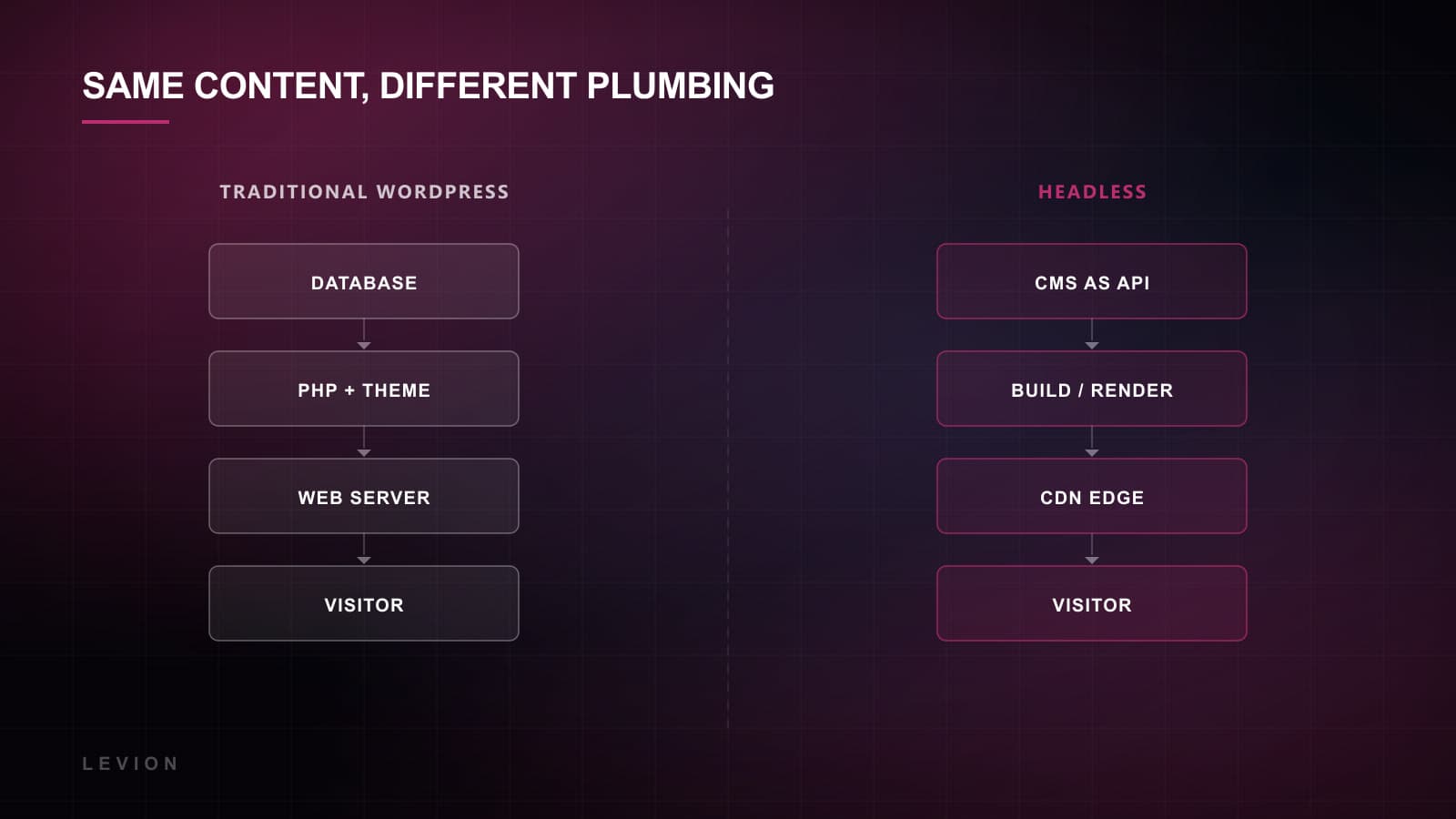
That separation is the entire story. Everything that follows, the speed and the flexibility and the extra cost, falls out of that one architectural decision. It's worth holding onto, because most of the arguments people have about this are really arguments about that trade in disguise.
Where traditional WordPress still wins
This is the part headless advocates tend to skip past quickly. WordPress runs about a third of the web, and the reasons for that are genuinely good ones.
- Editors get real visual editing. With a well-built block theme or Elementor, somebody in marketing can build a landing page on a Tuesday afternoon without opening a ticket. In headless, that page usually waits for a developer to define the component first.
- The ecosystem is enormous. Forms, memberships, WooCommerce, multilingual, booking. It exists, it's cheap, and it works today. Rebuilding any one of those in a headless stack is real budget and real weeks.
- It's cheaper to run and much easier to hire for. One host, one codebase, and a global pool of people who can maintain it without an onboarding period.
- It can be genuinely fast. We built Catalyst in WordPress with Elementor Pro and it scores 99 on Lighthouse with 100 on accessibility. Slow WordPress is a discipline problem, not a law of the platform.
Most sites that are slow on WordPress would also be slow headless. The plugins just move house.
Where headless genuinely wins
And now the other side of it, which is equally real and gets oversold by people who've only ever seen one of the two.
- Performance ceiling. A statically generated Next.js site serves pre-rendered HTML straight from a CDN. There's no database query anywhere in the critical path, so the floor stays high even on a bad day. Our Next.js builds sit at 99 Lighthouse without anyone performing heroics.
- One content source, many outputs. Website, mobile app, in-store screen, partner feed, all reading the same API. Once you have more than one surface, headless stops being a preference and turns into the obvious answer.
- Security surface. No public admin login, and no plugin carrying a CVE from 2021 sitting on your production server. The attack surface shrinks dramatically and stays shrunk.
- Interfaces that aren't pages. Dashboards, configurators, anything stateful. We built the Murtasec security dashboard in React for exactly this reason: a page-based CMS is simply the wrong shape for an application.
- Developer velocity at scale. Component-driven, typed, testable, deployable on every commit. On a large site that compounds hard, and on a small one you'll barely notice it.
The honest comparison
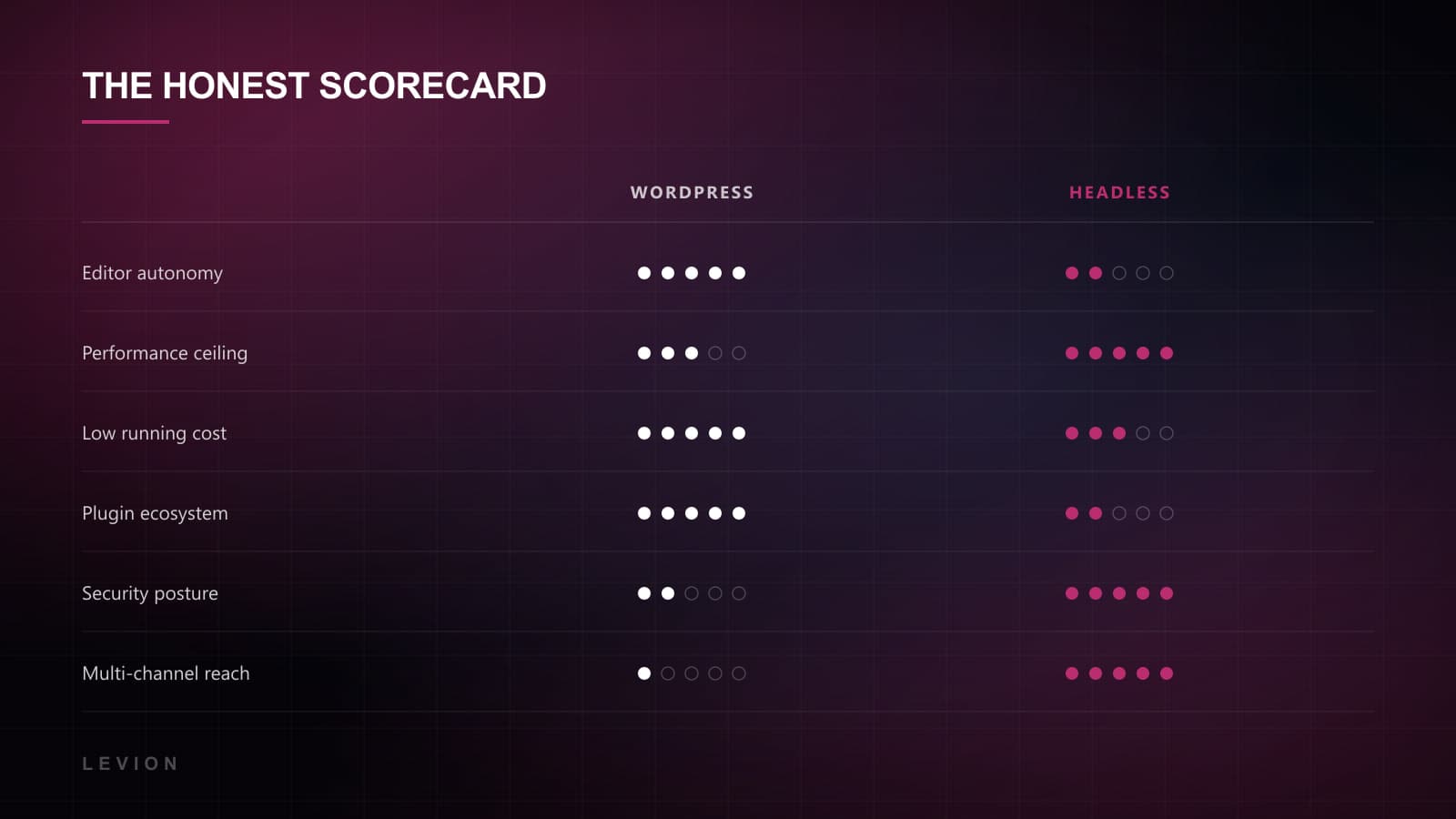
Read that as a set of trade-offs rather than a scoreboard. If editor autonomy is your top row, WordPress wins your project regardless of what the performance column happens to say, and no amount of arguing about milliseconds changes it.
The costs nobody puts in the quote
Headless carries three recurring costs that rarely make it into a proposal. They're the reason a certain number of these projects turn sour around the twelve-month mark, usually with everyone slightly baffled about how it happened.
- 01Preview is work. Editors expect to see a draft before publishing, reasonably enough. In headless that's a feature somebody has to build and then maintain, not a checkbox in a settings panel.
- 02Every new layout becomes a ticket. Unless you invest early in a flexible block model, marketing loses the ability to ship pages independently, which is very often the exact capability they were promised when the project was sold.
- 03Two systems, two upgrade paths. The CMS and the front end version independently. It isn't hard, but it isn't nothing either, and it never appears on a timeline.
There's a fourth cost, softer and harder to price: your team has to be comfortable with a deploy pipeline. If nobody in the building has opinions about Git, headless is going to feel like friction rather than freedom, no matter how good the architecture is.
The middle ground nobody mentions
The debate gets framed as binary and it really isn't. There are at least three positions sitting between classic WordPress and rip it out, and one of them is right for most of the companies who arrive convinced they need the full jump.
- Headless WordPress. Keep WordPress as the content API and put a Next.js front end in front of it. Nobody has to learn a new admin, nothing gets exported and re-imported, and the performance ceiling comes along with it. This is the option we recommend most often and the one that gets mentioned least.
- Static WordPress. Keep everything as it is, but pre-render the whole site to flat files and serve those instead. You lose the dynamic features and gain a lot of speed and security for very little work. Perfectly fine for a brochure site that changes weekly rather than hourly.
- Hybrid. Marketing site headless, blog on WordPress, or the other way round. Slightly more to maintain, but each half gets to be good at its own job instead of both being forced into a compromise.
One thing worth knowing before you commit to anything: the front end and the CMS are separable decisions. Choosing Next.js doesn't commit you to a particular CMS, and deciding to leave WordPress doesn't commit you to a particular front end. Teams routinely collapse these into a single decision and end up over-buying on both sides of it.
A worked example
Something concrete, because the abstractions get slippery fast. Say you're a fifteen-person B2B company. Marketing publishes two or three pages a month, mostly variations on a landing page. There's a customer portal on a subdomain built in React. Traffic is decent, organic matters to you, and the current WordPress site takes five seconds to load thanks to a page builder and a decade of accumulated plugins.
The instinct is to go headless, because it's slow. But look at what the actual constraint is. Marketing ships pages independently, and that's the capability keeping the company moving week to week. Take it away and you've traded two seconds of load time for a permanent bottleneck sitting at a developer's desk, which is a much worse deal than it looks on a slide.
The right answer here is usually headless WordPress, or quite often just a serious cleanup first. Remove the builder, rebuild the templates properly, cut the plugins down to five, and measure again. That's four weeks instead of four months, and if the site is still slow afterwards you've learned something real and the headless case then makes itself without anyone having to argue for it.
Five questions that decide it
We ask these on the first call. The answers point in the same direction about eighty percent of the time, and the other twenty percent are the interesting projects.
- 01How often does marketing need to publish a page nobody designed in advance? Often means WordPress.
- 02Is there more than one place the content has to appear? Yes means headless.
- 03Does the site include anything that behaves like an application rather than a document? Yes means headless.
- 04Is there an in-house developer, or will this be maintained by an agency on retainer? No developer nudges you toward WordPress.
- 05Is the current performance failing for structural reasons, or because somebody installed nineteen plugins? Structural means headless. Nineteen plugins means a cleanup, and probably a conversation.
One more, which isn't really a question so much as a warning. Don't choose headless because it's what the last conference talk recommended. The best stack is the one your team will still be able to use in two years without phoning anyone about it.
So which one, then?
If you're a content-led business publishing frequently, with a small team and no second channel, stay on WordPress and spend the money making it fast and well-structured instead. You'll be happier and roughly forty percent richer, and the site will be better.
If you have a product, multiple surfaces, a performance ceiling you keep hitting, or a marketing site that needs to feel like software rather than a brochure, go headless. That's the work we do most, and it's usually paired with a Next.js front end.
Whichever way you go, build for reversibility. Keep the content model clean and portable, avoid burying structure inside a proprietary page builder, and treat the CMS as something you could swap out in eighteen months without rewriting the front end. Every stack decision looks obvious for about two years and then quietly stops being obvious. The teams that cope well are the ones that didn't weld the pieces together.
Worth saying plainly too: the cost of getting this wrong is real but recoverable. We've moved sites in both directions and nobody died. What isn't recoverable is spending eight months arguing about it while the current site takes five seconds to load and the enquiry form still has eleven fields on it.
And if you're already on WordPress and worried about moving without wrecking your search visibility, that's a well-trodden path and the whole game is the redirect map. We wrote the full version up separately in migrating WordPress to Next.js without losing rankings. The short of it: crawl every old URL before you touch anything, 301 each one onto the nearest surviving page instead of dumping the lot on the homepage, and ship canonicals, sitemap and structured data on day one instead of treating them as phase two.