
Migrating WordPress to Next.js Without Losing Rankings

Someone always says it out loud, usually about twenty minutes into the meeting: what happens to our traffic? Four years of organic growth on WordPress, a rebuild in Next.js sitting on the table, and everyone in the room picturing the same thing — the Search Console graph dropping off a shelf in week two and staying down there.
It's a fair worry. We've been called in to clean up after migrations that did exactly that. But going back through those post-mortems, the framework was never what did the damage. It was a redirect map somebody built in a spreadsheet and never tested, or a handful of pages that got quietly shortened during the rebuild because the new layout looked better with less text in it. Neither of those is a React problem.
Why a WordPress to Next.js migration actually loses rankings
Four causes. Roughly in the order we run into them.
- 01Redirects done badly, or done at four in the afternoon on launch day. Old URLs 404. Or everything gets pointed at the homepage, which Google reads as a soft 404 and takes as a reason to drop the lot.
- 02Pages that got shorter. Someone trimmed the best-performing service page to fit a tighter layout and took six hundred words out of it. Those six hundred words were the ranking.
- 03The technical layer scheduled as phase two. Canonicals, sitemap, structured data, hreflang. There is no phase two. Googlebot turns up on day one and forms an opinion.
- 04Client-side rendering by accident. Next.js will quite happily let you fetch your main content inside a useEffect, and the page looks perfect to you and empty to a crawler.
The framework doesn't cost you rankings. The forty URLs nobody mapped do.
Before you touch anything: the inventory
This is one day of unglamorous work and it is the highest-value day in the project, because none of it can be recreated once the old site is switched off. We have tried. You end up guessing from the Wayback Machine, which is about as reliable as it sounds.
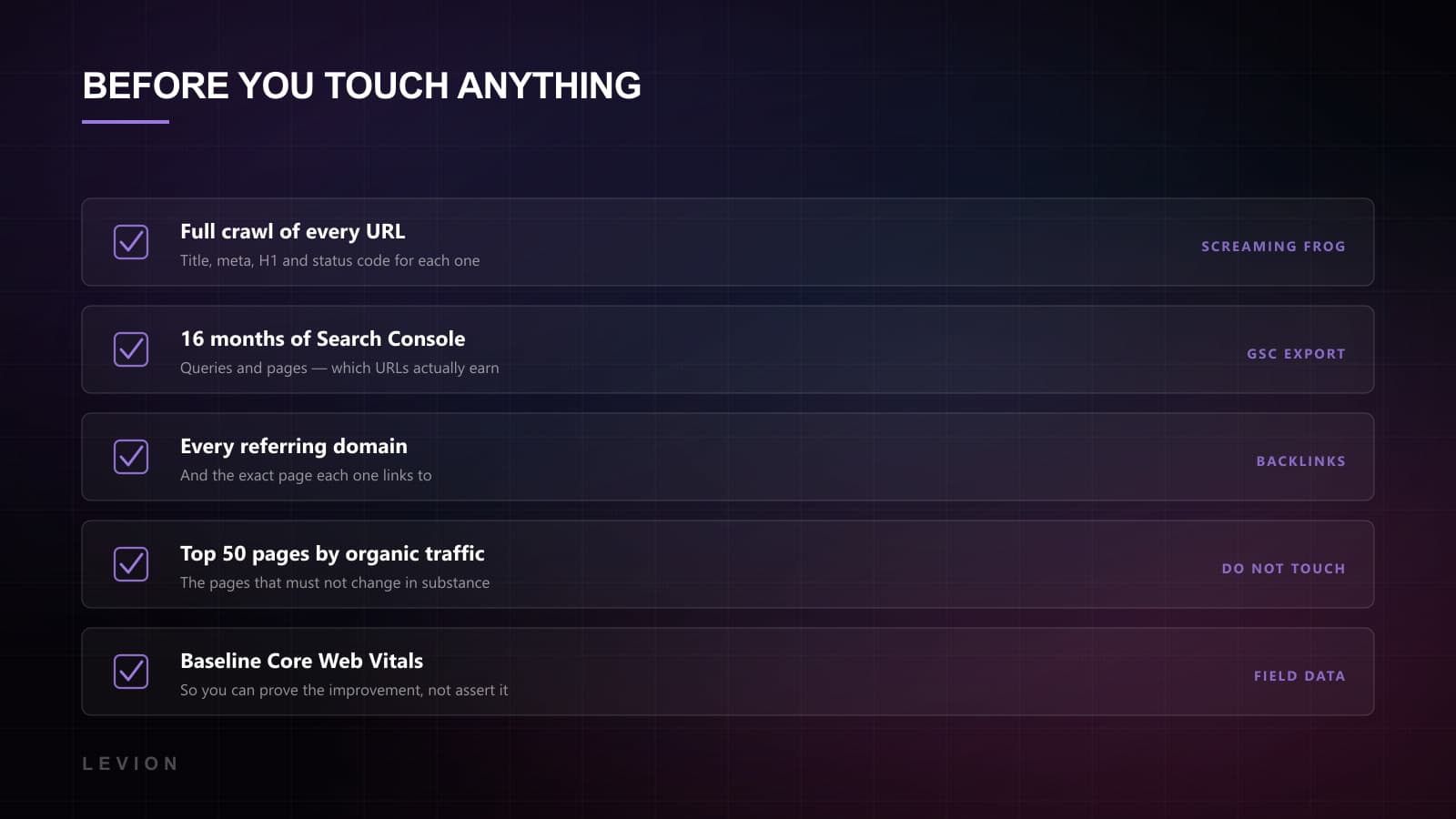
- A full crawl of every URL with its title, meta description, H1 and status code. Screaming Frog or similar, and don't stop at 500 URLs just because that's where the free licence stops.
- Search Console, sixteen months of queries and pages, exported before anything changes. This is the file that tells you which URLs actually earn their keep.
- Every referring domain and the exact page it points at. Backlinks land on specific URLs, and those URLs have to keep resolving afterwards.
- Your top fifty pages by organic traffic, in order. This is the list of pages that must not change in substance, however much anyone wants to reword them.
- Baseline Core Web Vitals, so that afterwards you can show the improvement instead of claiming it.
The migration itself, in seven steps
Seven is a slightly dishonest number, because step four takes longer than the other six put together. But the order matters more than the count, and this is the sequence we run.
- 01Decide where the content is going to live. Keep WordPress as a headless CMS, or move to something purpose-built. Keeping it is right more often than people expect: the editors already know it, and you skip the content migration entirely.
- 02Build templates, not pages. Post, page, category, service, case study. Get five templates right and two hundred pages come out right behind them.
- 03Port the content with its structure intact. Same headings, same depth, same internal links. Improve it in a later release, so you can attribute the effect to something.
- 04Write the redirect map. One row per old URL, all of them, including the paginated archives, the attachment pages and the ?p=123 short links nobody remembers publishing.
- 05Ship the technical layer in the first deploy. Canonical per page, sitemap, robots, JSON-LD, hreflang if you're bilingual. The first deploy, not the one after it.
- 06Render on the server by default. Static generation for anything a crawler needs to see, and save client rendering for the parts that are genuinely interactive.
- 07Stage it behind auth, crawl it, and diff that crawl against the old one. Titles, H1s, word counts, internal links. Fix what the diff shows you before launch.
The redirect map is the whole project
If you take one thing from this, take this: build the redirect map as a file in the repository, not as a task living in somebody's head or a shared sheet with four people's comments on it. Ours sits in the Next.js config, which means it gets reviewed, diffed and tested like any other code.
A few rules that keep saving us. Use 301, not 302. One hop only, because equity leaks at every step and some crawlers stop following after a handful of them. And send each old URL to its closest real equivalent rather than to the homepage. When there genuinely isn't an equivalent, a 410 is more honest than pretending there is.
Then test it, which is where almost everyone stops. Take the crawl from step one, run every old URL through the new site, and assert that each one lands on a 200 at the URL you intended. It's an afternoon's script. It finds the forty URLs a person reading a spreadsheet would not have found, and it finds the trailing-slash mismatch, which every migration has and nobody predicts.
Headless WordPress, and why it's often the right migration
Worth saying plainly, because it surprises people in the first meeting: migrating to Next.js does not mean abandoning WordPress. A headless WordPress migration, with WP as the content API and Next.js as the front end, is a perfectly respectable destination and it takes most of the risk out. Editors keep the interface they know. The content never moves. You still get the performance ceiling of a statically generated front end.
We've written the fuller comparison in headless CMS vs traditional WordPress. As a migration strategy it's the conservative choice, and conservative is usually correct here. The alternative, where the CMS, the front end and the content model all change in one release, is three migrations in a trenchcoat pretending to be one project.
Content migration: what to automate, what to do by hand
If you are leaving WordPress properly, this is where the timeline usually goes. The instinct is to script all of it. The instinct is about eighty percent right.
Automate the long tail. Blog posts, news items, anything with a repeating shape: export, transform, import, then spot-check fifty at random. What you're looking for is the quiet breakage. Internal links still pointing at old paths. Image references with absolute URLs from the old domain baked into them. Shortcodes arriving as literal text because nothing on the new side knows what a gallery tag means. Smart quotes coming through as mojibake. All four are common, and all four stay invisible until a client emails about one of them six weeks later.
Do the important pages by hand. Homepage, service pages, the top ten by traffic. Those deserve a person, because a heading structure that got subtly flattened in transit is exactly the kind of damage that costs you rankings without looking like anything at all. Ten pages done manually is a day of work. Recovering from an automated pass that turned every H2 into a paragraph is a month.
- Keep heading levels where they were. An H2 stays an H2, even when the new design would rather it were smaller.
- Rewrite image paths and re-export at sane dimensions while you're in there. Most WordPress media libraries are full of 4000px JPEGs nobody has ever needed.
- Preserve the publish dates. Resetting them tells search engines your entire archive was written yesterday, which is not the signal you're going for.
- Check the tables. Tables are where content migrations go to die, and they always look fine until someone opens one on a phone.
One more thing worth putting in the budget: somebody from the content side has to be reachable during the build, not just at the end of it. Migrations don't usually stall on engineering. They stall on decisions nobody was allowed to make. Whether two near-identical service pages should become one. Whether the 2019 press releases are worth carrying over. Ten-minute conversations, every one of them, that turn into two-week blockers when the only person who can answer is away.
Launch day, and the four weeks after it
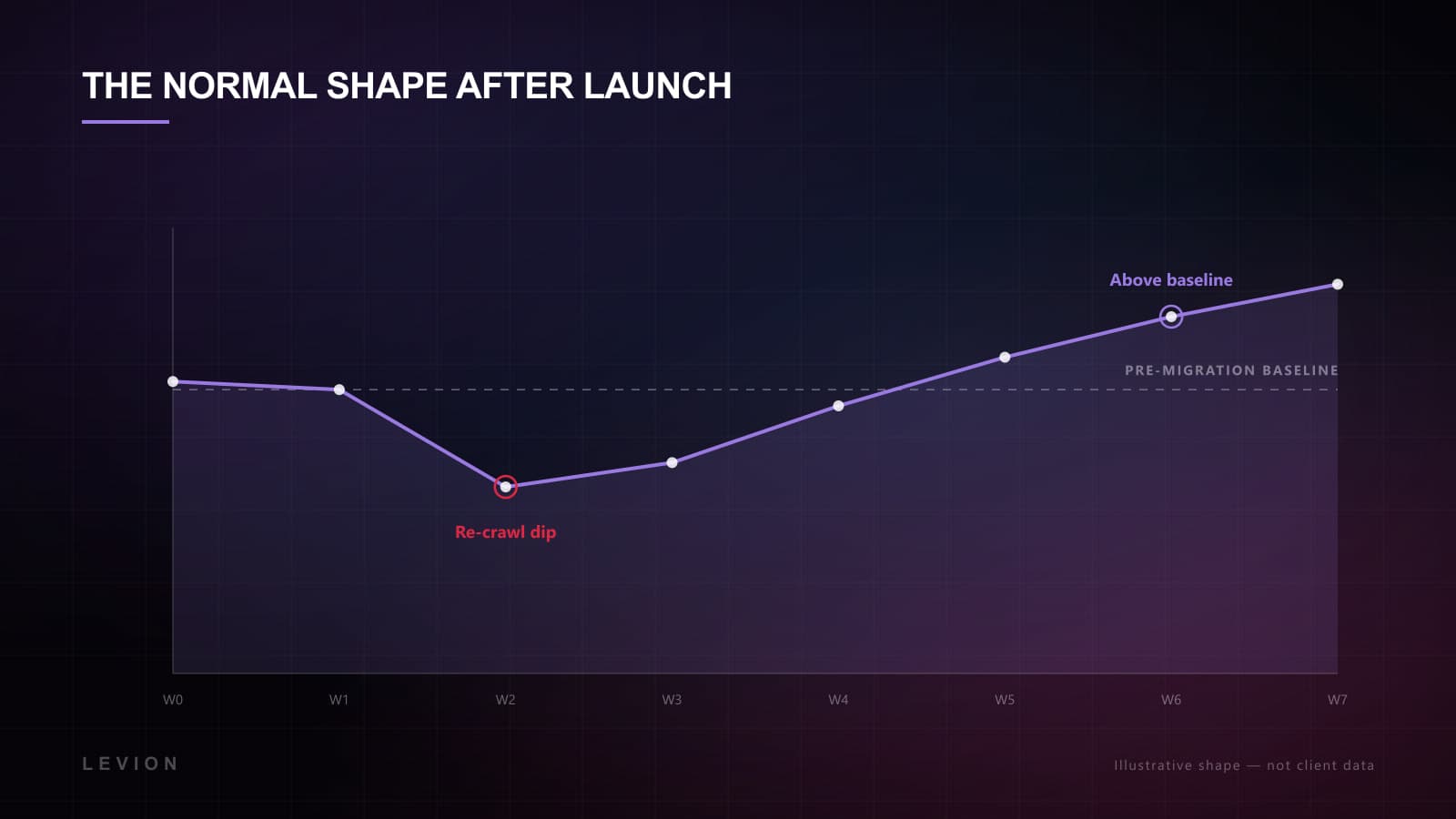
Launch on a Tuesday morning. Not Friday afternoon, whatever the release calendar says. You want two full working days with everyone still at their desks.
- 01Submit the new sitemap in Search Console within the hour, and run URL Inspection on your top ten pages to push a re-crawl rather than wait for one.
- 02Read the server logs for 404s every day for the first fortnight. What the crawler actually does beats any theory about what you might have missed.
- 03Watch Core Web Vitals in field data, not only the lab score. The lab tells you what the page can do; the field tells you what it did.
- 04Expect a dip around week two. That's Google re-crawling and re-scoring, and it should be shallow, and it should be recovering by week five or six.
- 05If it hasn't recovered by week six, go back to the redirect map. It is nearly always the redirect map.
What it looks like on the other side
Done properly the traffic comes back and then keeps going, because the foundation underneath it is better than the one you left. Our Next.js builds, Bay Eight Studios and ADS, sit around 99 average Lighthouse, and that number holds because of how the sites are built rather than because somebody tunes them every month.
On timelines, honestly: a marketing site of thirty or forty pages is six to eight weeks end to end, and that includes the inventory, the templates, the content port and the staging crawl. Add a second language, a complicated content model, or anything with a checkout in it, and you're counting in months. If someone quotes you two weeks for a site with real search traffic, they've quoted for the build and left the risky half of the job with you.
That's the actual case for moving, and it has nothing to do with Next.js being fashionable. Afterwards, the boring things get hard to break: speed, crawlability, a site that stays consistent as it grows. If a migration is on your table, this is how we run them. And the inventory day is worth doing this month, even if you never end up migrating at all.